Successful design is based on a principle known since the days of Julius Caesar: Divide and conquer. — Edward Yourdon and Larry L. Constantine, Structured Design
Separation of Concerns
This is a concept that was baked into webapp development from the outset:
HTML, CSS, and JavaScript are complementary languages used in the development of web pages and websites. HTML is mainly used for organization of webpage content, CSS is used for definition of content presentation style, and JavaScript defines how the content interacts and behaves with the user. — Wikipedia entry on Separation of Concerns
The Wikipedia entry for Separation of Concerns lists Subject-oriented programming and Aspect-oriented programming among the many methodologies developed to split software projects into manageable parts.
TL:DR There’s a huge amount of synonymous jargon from different schools on how best to split a software project into directories and files.
Over the centuries the Indians developed sign language for communicating phenomena of interest. Programmers from different tribes could use one that doesn’t require them to carry a blackboard on their ponies. — Perlism #70
Even as a sole developer without the problems of avoiding a large team of coders tripping over each other, organizing a large project into bite-sized parts improves the chances of completing it.
<script type=“module” src=“main.js”></script>
As per JavaScript tradition, there are confusingly many deprecated ways of doing modules and the ECMAScript standard is relatively recent.
To be allowed to import and export modules, the main client script needs to be declared in the HTML file like so:
<script type="module" src="main.js"></script>That module clients have type="module" confused
me, but that’s the convention.
You can only use import and export statements inside modules, not regular scripts. An error will be thrown if your <script> element doesn’t have the type=“module” attribute and attempts to import other modules. — Applying the module to your HTML
As explained in HTML
elements, the closing tag is mandatory with script even
if it contains no content.
A module’s name is its filename without the .js extension
The convention I’ve adopted for JavaScript comes from dabbling with Erlang where a module’s name is the same as its filename without the extension. Golang has adopted the same convention.
A module is just a file. One script is one module. As simple as that. — javascript.info
The key thing is the module provides the client with a namespace with dot-qualified names of its functions, unless the module is a single function in which case the module and function have same name. Modules with several functions are object literals, but ones that can’t be translated to JSON
A module only exports one thing: its name
A module should export wun thing, typically a function or an object full of functions. The exportation may be consumed by several other modules, so it is a good idea to freeze the exportation to prevent accidents or cross contamination. An exportation is an interface. Interfaces should be simple and clean. — Douglas Crockford in How JavaScript Works
While the top of a module file can have any number of imports, it ends with a solitary export that looks like so:
export default Object.freeze(moduleName);
Why the default keyword is needed
Using export default... simplifies the syntax of the
module’s client by allowing a default
import.
import game from "./modules/game.js";It is really unfortunate that that default word is there stinking things up. — Douglas Crockford, How JavaScript Works
Settling on only the “good parts” (default import for
modules) we can ignore named
import which requires curly braces, namespace
import, side
effect import…
Why the export object is frozen
If instead of ending with
export default Object.freeze(moduleName);I end with
export default moduleNameJSLint complains
1. Expected 'Object.freeze('. All export values should be frozen.Object.freeze(object) can take an object and freeze it, making it immutable… Immutable objects have excellent security properties. This is important because current industry practices encourage the installation of untrustworthy code into our systems. — Douglas Crockford, How JavaScript Works
JSDoc for modules
How To Design Programs is the textbook I wish I started with because it encourages the good habits of writing structured documentation and tests before coding, saving hours of debugging and refactoring later. It encourages following the following six steps when developing software:
- From Problem Analysis to Data Definitions
- Signature, Purpose Statement, Header
- Functional Examples
- Function Template
- Function Definition
- Testing
There’s some similarity with Agile programing in that both stress test-driven development. My critique of Agile is I’ve heard its salespeople say “Computers don’t read comments, people don’t read comments, so why write comments?”.
My view is structured comments, using JSDoc here, are essential, especially step 1 of the recipe, data definitions which double as APIs referenced constantly as the software develops. Step 2, writing a “Signature, Purpose Statement, Header” before diving into coding functions, also saves hours of coding and debugging later.
JSDoc has a @module tag which is a more specific form of namepath.
Module files start with structured comments looking like this:
/**
 * Mutators of state, some needing dragObject to get next state
 * @module modules/game
 */
Any string can be used in the module name declaration, and the
convention seems to be to include any subdirectory, in my case
modules, and then the filename without a .js
suffix.
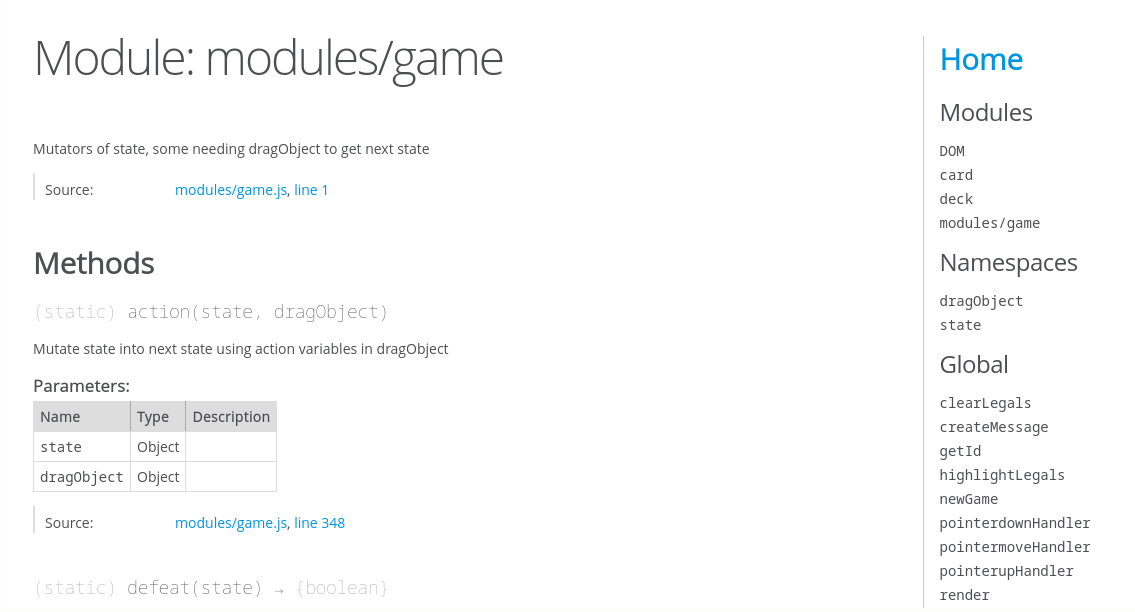
Because of its Java influence, JSDoc calls functions declared in module files as “methods” and separates them into static (aka public) and inner (aka private).
My public functions (those exported by agglutinating them to the module namespace) are written as function expressions, ie
/**
 * Example of an exported function
 * @function module:modules/modulename.myFunc
 * @param {Object} state - current state
 * @param {Object} dragObject - move to get next state
 */
modulename.myFunc = function (state, dragObject) {
  ...
};
while private functions use function declaration syntax:
/**
 * Example of auxiliary function local to the module
 * @function myFunc
 * @param {Object} state - current state
 * @param {Object} dragObject - move to get next state
 */
function myFunc(state, dragObject) {
  ...
}
What goes between the curly brackets use the same syntax, but function expressions need a closing semicolons while declarations don’t.
Test-driven development
I’ve covered testing using Jasmine in a separate article.
Something I’ve found tricky is testing private auxiliary
functions used inside modules. A hack I developed was commenting out the
import and export statements during the early stages and loading them as
“normal” JavaScript scripts into Jasmine’s HTML page. I’ve found it
simpler to just tag everything on to the module name initially, editing
them to be private late if desired.
Loose Coupling
It is better to have 100 functions operate on one data structure than 10 functions on 10 data structures. — Alan Perlis, Perlism #9
My interpretation of low coupling is “one data structure” and high cohesion is grouping together the 100 functions that operate on it into a module. Functions in a module should take the same argument(s) (ideally just the one data structure).
The key question is: How much of one module must be known in order to understand another module? The more that we must know of module B in order to understand module A, the more closely connected A is to B… Obviously, what we are striving for is loosely coupled systems — that is, systems in which one can study (or debug, or maintain) any one module without having to know very much about any other modules in the system. — Edward Yourdon and Larry L. Constantine, Structured Design
In my main script, object literals state and dragObject are non-local variables (aka free variables) which the various event listeners can mutate, and the render function can read the latest settings from. This can readily be made avaible in modules by passing them as parameters.
High Cohesion
Clearly, cohesion and coupling are interrelated. The greater the cohesion of individual modules in the system, the lower the coupling between modules will be… Both coupling and cohesion are powerful tools in the design of modular structures, but of the two, cohesion emerges from extenisve practice as more important. — Edward Yourdon and Larry L. Constantine, Structured Design
Modules vs Classes
In the 1980s and 1990s, modular programming was overshadowed by and often conflated with object-oriented programming… in class-based object-oriented languages there is still overlap and confusion with classes as a unit of organization and encapsulation. — Wikipedia Modular Programming
Whereas classes encourage syntax like
const myVar = new ClassName() to be used as
myVar.method1(), a module once imported would use
modulename.method1(myVar).
One advantage of not making myVar a class, but an object literal that can
be translated to JSON, is it’s usable with web workers,
fetch, and local storage.
Coming from Python, I initially thought JavaScript’s this
was similar to self, ie a placeholder for whatever
myVar instance variable was used.
Because this changes to say a function if using a
callback, I found myself going down the road of
const this = that and bind,
learning the hard way why Douglas Crockford encourages “classless”
JavaScript and his jslint.com
warns against this by default.
With more experience, I never use class
and the only time I use new ClassName() is for builtin
things like audio and other binary blobs.
Aspect-oriented Programming
Step 4 of the How To Design Programs recipe, Function Template, encourages programers to start by selecting the correct basic “shape” of a function. These are akin to the 23 patterns listed by the “Gang of Four” in their book Design Patterns which gave examples using object-oriented languages such as C++.
Peter Norvig demonstrates that 16 out of the 23 patterns in Design Patterns are simplified or eliminated by language features in Lisp or Dylan. Related observations were made by Hannemann and Kiczales who implemented several of the 23 design patterns using an aspect-oriented programming language (AspectJ) and showed that code-level dependencies were removed from the implementations of 17 of the 23 design patterns and that aspect-oriented programming could simplify the implementations of design patterns — Wikipedia entry on Design Patterns