Wun of the brilliant ideas in JavaScript is the object literal. It is a pleasant and expressive syntax for clustering information. — Douglas Crockford in How JavaScript Works
Like most programers, I enjoy coding games, and this website is a growing collection of games I’m writing to improve my JavaScript, CSS and HTML skills.
Something I learnt from a free online course General Game Playing is that games are state machines, and an important part of this is to represent the current state so that it can be visually rendered, and that legal moves and next states can be figured out from state variables.
JavaScript has a really nice way of representing the current state of a game by using what it calls an object literal.
What is an object literal?
Object Literals are comma separated key-value pairs between curly
brackets which differ from traditional OOP classes in that they don’t
require instantiation using the new operator.
const state = {"game": "game-name"};In Gang of Four parlance, object literals can be used for several patterns: I discuss singletons, command patterns, and flyweights. My style of writing modules is also to use object literals.
const vs let
Something that confused me, and I suspect most JavaScript novices, is
that while using const prevents you from reassigning
state or whatever you call your object literal, you are still
free to add variables agglutinated to it via dots or brackets — assuming
Object.seal()
hasn’t been used — and alter these variables assuming Object.freeze()
hasn’t been used.
A practical advantage of declaring the root object a
constant is it creates less work for the garbage collector which doesn’t
have to keep track of changing addresses. With let, there’s
a risk of wasting memory with multiple unused copies of a large abstract
data type.
Dots vs brackets
Once you’ve created your object literal, you can create or change the values of variables by simply tagging them on to it.
One of the many confusing things for JavaScript novices is the now
deprecated var declaration. It turns out
var x = 3; is syntactic sugar for:
window.x = 3;Where window is the global object if you are
using JavaScript in a browser, causing the danger that one of window’s
many existing properties might get garbled by a badly selected variable
name. This is a good reason to avoid var and rather pin
variables to your own defined namespace object literals.
JavaScript offers two synonymous ways of doing this:
const myObj = {};
myObj.x = 3;
myObj["x"] = 3;
JSLint warns against bracket notation:
1. ['x'] is better written in dot notation.Dots are more succinct, but a key advantage brackets have over dots
is they can contain variables. One handy use of that is to use them to
route commands, eg
command[event.type][event.code];, avoiding a pyramid of
doom of nested if or switch statements.
Another reason to sometimes use brackets instead of dots is keys then don’t have to be a legal JavaScript variable names. For instance, JavaScript doesn’t allow kebab case, ie hyphenated words. The keys in my object literals tend to be ids used in my HTML and CSS files, and sometimes URLs, where kebab case is the preferred style. There’s no problem using these as object keys provided they are quoted inside a bracket.
Advantages of JSON equivalent object literals
Data dominates. If you’ve chosen the right data structures and organized things well, the algorithms will almost always be self-evident. Data structures, not algorithms, are central to programming. — Rob Pike’s Rule 5
Once you have created an object literal, JavaScript places no constraints on what you can put in it, but limiting it to what JSON.stringify(state) can write and JSON.parse(state) can read has several advantages:
- The current game state can be saved by the browser using localStorage.
- Copies of the current game state can be made using structuredClone.
- For games where the server acts as an AI player, fetch can use it in its body for call and response messages.
- Similarly for concurrency-oriented programing, aka Web Workers — where Do not communicate by sharing memory; instead, share memory by communicating was introduced by Erlang and reinvented by Go — JSON messages work nicely.
- Stringified JavaScript objects can be tested for equality, as explained in object equality.
- If properly documented as a data definition, an object literal becomes an application programming interface for loosely coupling modules.
Some might consider being able to use them with postMessage() another advantage, but since popups and iframes are a pet hate of mine, I don’t use it.
As explained in this Mozilla
Developer article, JSON is a subset of JavaScript object syntax.
Keys have to be double quoted as in “key”. JSON.stringify defaults to
translating various things like undefined to
null.
My style for modularization is to have
one object-literal containing functions exported. This would be turned
into an empty object {} by JSON.stringify.
To ensure object-literals representing data are valid JSON to avoid mistranslations later, I like to store them as JSON files while the module object literals are stored as JavaScript files.
An example of a game state with its initial values stored as a JSON file is:
{
  "Attack1": [],
  "Attack2": [],
  "Attack3": [],
  "Attack4": [],
  "Damage": [],
  "Hand1": "./cards/blank.svg",
  "Hand2": "./cards/blank.svg",
  "Hand3": "./cards/blank.svg",
  "Monster1": [],
  "Monster2": [],
  "Monster3": [],
  "Monster4": [],
  "PowerDeck": [],
  "game": "clear-the-dungeon-beginner"
}
This JSON data gets imported into my game.js module like so:
import START from "../data/start.json" with { type: "json" };Crockfords’ jslint.com used to
barf if one added with { type: "json" } to an import
statement. My request to make it valid was accepted, so hopefully my
style becomes widespread.
Documenting data definitions
I’m a big fan of the free online textbook How To Design Programs, specifically its six step design recipe:
- From Problem Analysis to Data Definitions
- Signature, Purpose Statement, Header
- Functional Examples
- Function Template
- Function Definition
- Testing
For a JSON-style object literal (ie one that can be saved by
localStorage, used as a message by fetch, and
as an interface for modules), step 1, documenting a data definition,
comes in very handy since I find this definition needs to be constantly
referenced as the rest of the code gets fleshed out.
If you’re using ?. (aka optional chaining) because you forgot to initialise properties, or Object.hasOwn() to check if a key exists, poor documentation is probably to blame.
The only documentation system I’m aware of for JavaScript is JSDoc which unfortunately is very Java-influenced, forcing OOP-jargon even if I’m doing what Crockford terms “class free” or “classless” JavaScript.
Though JavaScript doesn’t have namespaces per se, JSDoc has the @namespace. tag which I use to create reference material for a given game’s state (ie JSON data) object literal:
/**
 * The filename of a card image,
 * eg "./cards/2_of_spades.svg" or "./cards/jack_of_diamonds2.svg"
 * @typedef {string} card
 */

/**
 * Game state, an object literal initialised from values in start.json and kept in localStorage
 * @namespace {Object} state
 * @property {card[]} Attack1 - face-up monster plus cards played against it
 * @property {card[]} Attack2 - face-up monster plus cards played against it
 * @property {card[]} Attack3 - face-up monster plus cards played against it
 * @property {card[]} Attack4 - face-up monster plus cards played against it
 * @property {card[]} Damage - Starts empty, defeat if reaches 7
 * @property {card} Hand1 - face-up card dealt from PowerDeck
 * @property {card} Hand2 - face-up card dealt from PowerDeck
 * @property {card} Hand3 - face-up card dealt from PowerDeck
 * @property {card[]} Monster1 - Deck of 3 royal cards
 * @property {card[]} Monster2 - Deck of 3 royal cards
 * @property {card[]} Monster3 - Deck of 3 royal cards
 * @property {card[]} Monster4 - Deck of 3 royal cards
 * @property {card[]} PowerDeck - Number cards and 2 jokers
 * @property {string} game - "clear-the-dungeon-beginner"
 */
const state = {"game": "clear-the-dungeon-beginner"};
Then running
jsdoc -d doc -r . -R README.mdproduces
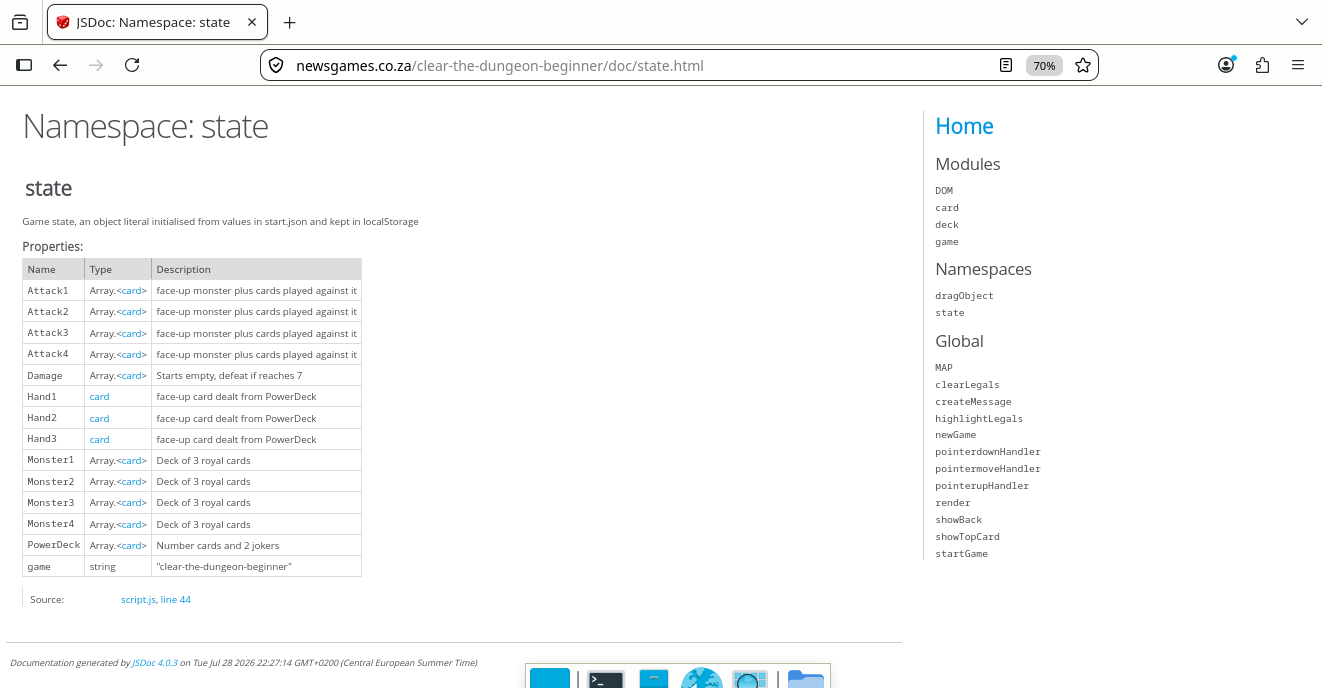
Object literals make good APIs
If you have a procedure with ten parameters, you probably missed some. — Alan Perlis, Perlism 11
The first HTML5 game I did was RiceRocks, a traditional video game which I translated into JavaScript from Rice University’s Interactive Python MooC.
This involved using JavaScript’s canvas API, specifically drawImage which has nine parameters:
ctx.drawImage(image, sx, sy, sWidth, sHeight, dx, dy, dWidth, dHeight);Rather than trying to remember the order of all those arguments, plus all the others needed for a sprite assuming it’s moving at an angle while possibly spinning and may have things like a time before it explodes and needs to switch sprite sheets, it’s much easier to bundle all this data into an object literal and simply pass that as a single argument.
The image paramater in drawImage should
typically be something like images.asteroid as explained in
the flyweight object literal, allowing
the same binary blob to be used multiple times simultaniously.
How to test object literals
As mentioned in my testing article, I like Jasmine because of its “No Magic” philosophy. And as mentioned in my modularization article, I tend to pass JSON-type object literals to the modules which mutate one of its variables rather than returning anything.
This design makes it easy to use “test doubles”:
import legals from "../modules/legals.js";

describe("Legals tests", function() {

  it ('Player does pointer down on draw deck', function() {
    const dragObject = {
      fromID: "draw"
    };
    const state = {
    };
    legals(state, dragObject);
    expect(dragObject.legals).toEqual(["draw"]);
  });

});
Singleton Patterns
Singletons are often preferred to global variables because they do not pollute the global namespace (or their containing namespace). Additionally, they permit lazy allocation and initialization, whereas global variables in many languages will always consume resources. — Wikiepedia entry for singleton pattern.
I use two singletons: state which is a JSON-equivalent
object literal which is declared as a global constant in the main client
script file, and dragObject which contains a clone of the
HTML image element getting dragged. Since dragObject is
ephemeral as explained in pointer events, it
doesn’t need to be stored.
The state object literal needs to be a free
variable (aka non-local) so event handlers can update them whenever
they are triggered. This is particularly important for video games — my
first browser game was RiceRocks which only had
one script whose core function was:
function animationLoop() {
  clearScene();
  drawState();
  playSound();
  updateState();
  window.requestAnimationFrame(animationLoop);
}
With more experience, if I refactored this game I’d probably split the four functions in the loop to separate modules like so:
function animationLoop() {
  clearScene(state);
  draw(state);
  playSound(state);
  update(state);
  window.requestAnimationFrame(animationLoop);
}
Command Patterns
Somewhere in every game is a chunk of code that reads in raw user input — button presses, keyboard events, mouse clicks, whatever. It takes each input and translates it to a meaningful action in the game. — Robert Nystrom, Game Programming Patterns
The original version of video game RiceRocks just listened for KeyboardEvents, only reacting to four keys.
I started with Mozilla’s example
using switch with case statements.
Subsequently, I’ve found using an object literal with all get
functions more elegant.
const state = {
  isLeft: false,
  isRight: false,
  isUp: false,
  isSpacebar: false
};

const command = {
  keydown: {
    get ArrowLeft() {
      state.isLeft = true;
    },
    get ArrowRight() {
      state.isRight = true;
    },
    get ArrowUp() {
      state.isUp = true;
    },
    get Spacebar() {
      state.isSpacebar = true;
    }
  },
  keyup: {
    get ArrowLeft() {
      state.isLeft = false;
    },
    get ArrowRight() {
      state.isRight = false;
    },
    get ArrowUp() {
      state.isUp = false;
    },
    get Spacebar() {
      state.isSpacebar = false;
    }
  }
};

document.addEventListener("keydown", (event) => command.keydown[event.key]);
document.addEventListener("keyup", (event) => command.keyup[event.key]);
My taste in browser-based games has switched from video games where keyboard events can be organized:
command[event.type][event.code];to card games requiring a more complex chain of command.
action[fromID][toID][suit][rank];Using object literals this way helps create a template so none of the cases gets forgotten, and these objects can be modularized.
A restriction on getters is they can receive no arguments, so all the data they need must be a free variable — either a global if they are in the main client script as above or they need to be nested inside a function that received the required data as an argument in a module.
Using object literals this way ties in with what Rob Pike terms data-drive programing.
Algorithms, or details of algorithms, can often be encoded compactly, efficiently and expressively as data rather than, say, as lots of if statements. The reason is that the complexity of the job at hand, if it is due to a combination of independent details, can be encoded. A classic example of this is parsing tables, which encode the grammar of a programming language in a form interpretable by a fixed, fairly simple piece of code. Finite state machines are particularly amenable to this form of attack, but almost any program that involves the ‘parsing’ of some abstract sort of input into a sequence of some independent ‘actions’ can be constructed profitably as a data-driven algorithm. — Rob Pike, Notes on Programming in C
Flyweight Patterns
The pattern was first conceived by Paul Calder and Mark Linton in 1990 and was named after the boxing weight class that includes fighters weighing less than 112lb. The name Flyweight itself is derived from this weight classification as it refers to the small weight (memory footprint) the pattern aims to help us achieve. — Addy Osmani, Learning JavaScript Design Patterns
While RiceRocks has a dozen asteroids spinning at any given time, they all share the same blob of binary data stored in image.js as:
const images = { "background": new Image()
               , "debris": new Image()
               , "spaceship": new Image()
               , "asteroid": new Image()
               , "explosion": new Image()
               , "missile": new Image()
               };
I initially stored pointers to these binary blobs in each sprite as an attribute called image, but thanks to my experiment with web workers where references can’t be shared and JavaScript wisely refuses to clone big blobs of binary, I realise all the sprite needed was a string corresponding to a key in the image dictionary.
The same applies to sound.
I discovered I’d already unwittingly implemented the flyweight pattern by not duplicating blobs read from png or ogg files, storing them once in dictionaries and refencing them via short string names.