A programming language is low level when its programs require attention to the irrelevant. — Perlism #8
Array literals use square brackets as opposed to the curly brackets used by object literals.
Everytime I return to JavaScript, I find myself having to refresh on
the difference between splice, slice,
toSpliced… so heeding my own advice on Learn by Testing, I’ve
made these simple examples to reference as
needed.
Never create when you can mutate
Working through these examples, I found splice is nearly always the best tool for the job, generalizing pop, push, shift, unshift, concat… It mutates the array rather than create a new copy, which though frowned upon by functional programing purists, is far more memory efficient.
My advice to use const rather
than let is probably more applicable to arrays than objects. Just as
using const myObj = {} doesn’t prevent you from creating
and updating the keys and values it contains,
const myArr = [] lets you manipulate its elements at will
while reducing the risk of wasting memory with unnecessary copies.
If you ever find yourself reassigning an array like this
let myArr = [1,2,3,4];
myArr = myArr.concat([5,6,7,8]);
you should be using
myArr.splice(myArr.length,0,...[5,6,7,8]) to avoid wasting
memory.
Similarly if you catch yourself doing
let myArr = [1,2,3,4];
myArr = myArr.map((x) => x * 2);
you should be using forEach.
Removing an item by value
This involves using splice and indexOf
as in splice(start, deleteCount) which returns an array of
length deleteCount, ie one in this example.
describe("array operations", function() {

  it ('Remove "d" from ["a","b","c","d","e","f","g","h"]', function() {
    const myArr1 = ["a","b","c","d","e","f","g","h"];
    const myArr2 = myArr1.splice(myArr1.indexOf("d"), 1);
    expect(myArr1).toEqual(["a","b","c","e","f","g","h"]);
    expect(myArr2).toEqual(["d"]);
  });

});
One thing to beware of is if we try to remove an item that isn’t in the array, the last item get removed.
  it ('Removing missing item returns last element', function() {
    const myArr1 = ["a","b","c","d","e","f","g","h"];
    const myArr2 = myArr1.splice(myArr1.indexOf("x"), 1);
    expect(myArr1).toEqual(["a","b","c","d","e","f","g"]);
    expect(myArr2).toEqual(["h"]);
  });
Replacing an item by value
Instead of just removing “d”, I want to replace it with “x”. This requires only a slight modification to the above example.
  if ('replace "d" with "x"', function() {
    const myArr1 = ["a","b","c","d","e","f","g","h"];
    const myArr2 = myArr1.splice(myArr1.indexOf("d"), 1, "x");
    expect(myArr1).toEqual(["a","b","c","x","e","f","g","h"]);
    expect(myArr2).toEqual(["d"]);
  });
Replacing an item by position
Though we can use splice, it’s much easier to use
myArr[start] = item1;
describe("array operations", function() {

  it ('Replace "d" with "x" using splice in ["a","b","c","d","e","f","g","h"]', function() {
    const myArr = ["a","b","c","d","e","f","g","h"];
    myArr.splice(3, 1, "x");
    expect(myArr).toEqual(["a","b","c","x","e","f","g","h"]);
  });

  it ('Replace "d" with "x" using assignment in ["a","b","c","d","e","f","g","h"]', function() {
    const myArr = ["a","b","c","d","e","f","g","h"];
    myArr[3] = "x";
    expect(myArr).toEqual(["a","b","c","x","e","f","g","h"]);
  });

});
Removing the first item
For historical reasons, as nearly all programing languages, JavaScript has specific operators for dealing with the first and last items in arrays. I find it easier to simply use splice with index 0 or myArr.length, but most coders seem to love tradition and doing things the antian way.
JavaScript has (what I find confusingly named) the shift operator for this:
  it ('Shift first item from ["a","b","c","d","e","f","g","h"]', function() {
    const myArr = ["a","b","c","d","e","f","g","h"];
    const first = myArr.shift();
    expect(myArr).toEqual(["b","c","d","e","f","g","h"]);
    expect(first).toEqual("a");
  });
Alternatively, splice can do this using index 0 and remembering a one-length array is returned, not an individual element.
  it ('Splice first item from " ["a","b","c","d","e","f","g","h"]', function() {
    const myArr = ["a","b","c","d","e","f","g","h"];
    const first = myArr.splice(0, 1)[0];
    expect(myArr).toEqual(["b","c","d","e","f","g","h"]);
    expect(first).toEqual("a");
  });
Removing the last item
Seventies programing languages like Lisp and Prolog had arrays/lists implemented with “one pointer per node because every byte was precious”, creating the danger of very slow progams if they had to traverse to the end of a long list repeatedly. I’ve seen that warning repeated for JavaScript, but don’t think it actually makes much performance difference for LIFO or FIFO.
Here JavaScript uses the conventional name pop.
Alternatively, this can be generalized for splice using
myArr.length - 1 as the index.
  it ('Pop last item from ["a","b","c","d","e","f","g","h"]', function() {
    const myArr = ["a","b","c","d","e","f","g","h"];
    const last = myArr.pop();
    expect(myArr).toEqual(["a","b","c","d","e","f","g"]);
    expect(last).toEqual("h");
  });

  it ('Splice last item from ["a","b","c","d","e","f","g","h"]', function() {
    const myArr = ["a","b","c","d","e","f","g","h"];
    const last = myArr.splice(myArr.length - 1, 1)[0];
    expect(myArr).toEqual(["a","b","c","d","e","f","g"]);
    expect(last).toEqual("h");
  });
Splitting an array into two
Let’s say we have an array of cards and we want to draw the first
three into our hand, again splice(start, deleteCount) is
our template.
describe("array operations", function() {

  it ('Draw first three elements of ["a","b","c","d","e","f","g","h"]', function() {
    const deck = ["a","b","c","d","e","f","g","h"];
    const hand = deck.splice(0, 3);
    expect(deck).toEqual(["d","e","f","g","h"]);
    expect(hand).toEqual(["a","b","c"]);
  });

});
Drawing more cards than are in the deck
A fairly common problem I had writing code for card games is “what happens when there are too few cards left in the deck to deal?”.
I started out laboriously guarding against too short decks using
deck.length > 3 or whatever, and discovered
splice simply takes fewer elements without complaining.
  it ('Draw more than available', function() {
    const deck = ["g","h"];
    const hand = deck.splice(0, 3);
    expect(deck).toEqual([]);
    expect(hand).toEqual(["g","h"]);
  });
Move all but first element
This is a problem that came up coding The Emissary.
  it ("move all but first element into another array", function() {
    const deck = ["a","b","c","d"];
    const discard = ["e","f","g","h"];
    discard.splice(discard.length, 0, ...deck.splice(1, deck.length - 1));
    expect(deck).toEqual(["a"]);
    expect(discard).toEqual(["e","f","g","h","b","c","d"]);
  });
Inserting an item
Again splice
is what we want as in splice(start, deleteCount, item1)
where deleteCount is zero (so an empty array is returned
which we can ignore), start is the position where we want
to insert, and item1 the element to insert.
describe("array operations", function() {

  it ('Insert "x" into idx=3 position in ["a","b","c","d","e","f","g","h"]', function() {
    const myArr = ["a","b","c","d","e","f","g","h"];
    myArr.splice(3, 0, "x");
    expect(myArr).toEqual(["a","b","c","x","d","e","f","g","h"]);
  });

});
Adding an element to the front
JavaScript calls this operation unshift, something I confuse with shift constantly, so just using splice with index 0 might be easier.
  it ('Unshift "x" to ["a","b","c","d","e","f","g","h"]', function() {
    const myArr = ["a","b","c","d","e","f","g","h"];
    myArr.unshift("x");
    expect(myArr).toEqual(["x","a","b","c","d","e","f","g","h"]);
  });

  it ('Add "x" to front of ["a","b","c","d","e","f","g","h"]', function() {
    const myArr = ["a","b","c","d","e","f","g","h"];
    myArr.splice(0,0,"x");
    expect(myArr).toEqual(["x","a","b","c","d","e","f","g","h"]);
  });
Adding an element to the back
If you have pop, you inevitably have push. For sake of completeness, I’ve shown pushing is just another general case for splice, using the length of the array as the start index.
But perhaps because JavaScript’s arrays were historically the same as
its objects, just with numbers instead of strings as keys, it allows
myArr[myArr.length] = "i"; which I find easier.
  it ('Push "i" to ["a","b","c","d","e","f","g","h"]', function() {
    const myArr = ["a","b","c","d","e","f","g","h"];
    myArr.push("i");
    expect(myArr).toEqual(["a","b","c","d","e","f","g","h","i"]);
  });

  it ('Splice "i" to end of ["a","b","c","d","e","f","g","h"]', function() {
    const myArr = ["a","b","c","d","e","f","g","h"];
    myArr.splice(myArr.length,0,"i");
    expect(myArr).toEqual(["a","b","c","d","e","f","g","h","i"]);
  });

  it ('Add "i" to ["a","b","c","d","e","f","g","h"]', function() {
    const myArr = ["a","b","c","d","e","f","g","h"];
    myArr[myArr.length] = "i";
    expect(myArr).toEqual(["a","b","c","d","e","f","g","h","i"]);
  });
Repositioning an element
This is a problem that came up implementing He will not Stop where a card can be moved in your hand.
  it ('move "g" from idx = 6 to idx = 2', function() {
    const myArr = ["a","b","c","d","e","f","g","h"];
    myArr.splice(2, 0, arr.splice(6, 1)[0]);
    expect(myArr).toEqual(["a","b","g","c","d","e","f","h"]);
  });

  it ('move "c" from idx = 2 to idx = 6', function() {
    const myArr = ["a","b","c","d","e","f","g","h"];
    myArr.splice(6, 0, arr.splice(2, 1)[0]);
    expect(myArr).toEqual(["a","b","d","e","f","g","c","h"]);
  });
Moving the top card to bottom of deck
A fairly common operation in card games is to move the top card to the bottom so as to examine the discard pile. What makes this tricky is rememembering this is not the same as adding an item to the back since the length of the pile doesn’t change.
  it ("move top card to bottom of deck", function() {
    const deck = ["a","b","c","d","e","f","g","h"];
    deck.splice(deck.length - 1, 0, ...deck.splice(0, 1));
    expect(deck).toEqual(["b","c","d","e","f","g","h","a"]);
  });
Inserting several items
The above pattern works on any number of items to be inserted
splice(start, 0, item1, item2, item3...)
describe("array operations", function() {

  it ('Insert "x","y", and "z" starting at idx=3 ["a","b","c","d","e","f","g","h"]', function() {
    const myArr = ["a","b","c","d","e","f","g","h"];
    myArr.splice(3, 0, "x","y","z");
    expect(myArr).toEqual(["a","b","c","x","y","z","d","e","f","g","h"]);
  });

});
Inserting an array
Note this is for when you want a flat array, ie not a nested array in an array.
Thanks to JavaScript’s spread syntax all we need to do is add three dots before the array we want to insert to make it work the same way as the above example.
describe("array operations", function() {

  it ('Insert ["x","y","z"] starting at idx=3 ["a","b","c","d","e","f","g","h"]', function() {
    const myArr = ["a","b","c","d","e","f","g","h"];
    myArr.splice(3, 0, ...["x","y","z"]);
    expect(myArr).toEqual(["a","b","c","x","y","z","d","e","f","g","h"]);
  });

});
Concatenation
While JavaScript has concat,
splice has the advantage of not creating a new array. As the
first example shows, if you want to keep the same variable name for an
array that gets added to via concatenation, you have to use
let to allow reassignment, so splice is
better.
  it ('["a","b","c","d"].concat(["e","f","g","h"])', function() {
    let myArr = ["a","b","c","d"];
    myArr = myArr.concat(["e","f","g","h"]);
    expect(myArr).toEqual(["a","b","c","d","e","f","g","h"]);
  });

  it ('splice(myArr.length,0, ...["e","f","g","h"])', function() {
    const myArr = ["a","b","c","d"];
    myArr.splice(myArr.length,0, ...["e","f","g","h"]);
    expect(myArr).toEqual(["a","b","c","d","e","f","g","h"]);
  });
Whereas Python among others allows + to join
arrays/lists, there’s a gotcha in JavaScript in that the arrays get
converted to strings and joined, giving a weird and unexpected
result.
  it ('["a","b","c","d"] + ["e","f","g","h"]', function() {
    expect(["a","b","c","d"] + ["e","f","g","h"]).toEqual("a,b,c,de,f,g,h");
  });
Sort alphabetically
By default, JavaScript’s default sort converts the input to strings and sorts ascending, which tripped me up thinking numbers would be sorted correctly automatically.
describe("array operations", function() {

  it ('Alphabetic ascending is the default', function() {
    const myArr = [1, 30, 4, 21, 100000];
    myArr.sort();
    expect(myArr).toEqual([1, 100000, 21, 30, 4]);
  });

});
Sort ascending numbers
This arrow
function (a, b) => a - b is used for this.
describe("array operations", function() {

  it ('Ascending numerical sort', function() {
    const myArr = [1, 30, 4, 21, 100000];
    myArr.sort((a, b) => a - b);
    expect(myArr).toEqual([1, 4, 21, 30, 100000]);
  });

});
Sort descending numbers
The comparison function needs to be altered to
(a, b) => b - a.
  it ('Descending numerical sort', function() {
    const myArr = [1, 30, 4, 21, 100000];
    myArr.sort((a, b) => b - a);
    expect(myArr).toEqual([100000, 30, 21, 4, 1]);
  });
Removing duplicates
Here the Set object introduced in 2015 is a big help. I thought Set might also sort an array, but it only removes duplicates.
  it ('Remove duplicates using Set', function() {
    const myArr = ["a","b","b","c","c","c","d","d","d","d"];
    expect([...new Set(myArr)]).toEqual(["a","b","c","d"]);
  });
Intersection
Set.intersection was introduced to JavaScript in 2024, so relatively new.
  it ('Intersection of two arrays using Set', function() {
    const myArr1 = ["a","b","c","d","e"];
    const myArr2 = ["d","e","f","g","h"];
    expect([...new Set(myArr1).intersection(new Set(myArr2))]).toEqual(["d","e"]);
  });
Difference
Again Set.difference is relatively new, only available since 2024.
  it ('Difference of two arrays using Set', function() {
    const myArr1 = ["a","b","c","d","e"];
    const myArr2 = ["d","e","f","g","h"];
    expect([...new Set(myArr1).difference(new Set(myArr2))]).toEqual(["a","b","c"]);
  });
Aggregation
I’m using the database term for when we want to get something such as the sum, max, min, avg… ie turning an array into a single value.
In JavaScript, this is typically done with Array.reduce(callback, initialValue).
The callback is typically an arrow function
which for sum would be (a,b) => a + b where a
is an accumulator and b the current element in the array. The
initial value of the accumulator for sum would be 0. This is the value
that would be returned for an empty array, so if a sum aggregation
returns 0, it needs be checked that’s the total rather than no data
provided.
 it ('sum of [1, 2, 3, 4] is 10', function() {
   const myArr = [1, 2, 3, 4];
   expect(myArr.reduce((a,b) => a + b, 0)).toBe(10);
 });

 it ('sum of [] is 0', function() {
   const myArr = [];
   expect(myArr.reduce((a,b) => a + b, 0)).toBe(0);
 });
A MooC I did a while back pointed out that map is a form of reduce with an initial value of [] to which each mapped element from the original array gets concatenated.
 it ('map example done with reduce', function() {
   const myArr1 = [1, 4, 9, 16];
   const myArr2 = myArr1.reduce((a,b) => a.concat([b * 2]), []);
   expect(myArr2).toEqual([2, 8, 18, 32]);
 });
Unless we actually want a new array, forEach is a better way of translating an array.
 it ('forEach is a more memory efficient way of "mapping"', function() {
   const myArr = [1, 4, 9, 16];
   myArr.forEach(function(x, idx) {
     myArr[idx] = x * 2;
   });
   expect(myArr).toEqual([2, 8, 18, 32]);
 });
Shuffling
This tripped me up with a subtle bug explained in my testing arrays article.
function shuffle(arr) {
  let jdx;
  arr.forEach(function(dummy, idx) {
    jdx = Math.floor(Math.random() * (idx + 1));
    [arr[idx], arr[jdx]] = [arr[jdx], arr[idx]];
  });
};
Having the unused first parameter, which I’ve called
dummy, in the forEach callback bugged me and I
thought I could use it instead of arr[idx] in the destructuring
operator [arr[idx], arr[jdx]] = [arr[jdx], arr[idx]], but
that caused the function to duplicate some cards, causing others to go
awol.
Function chaining scope
A gotcha I ran into writing a function to find the longest array within an array was when I tried:
const idx = positions.map((p) => p.length).indexOf(Math.max(...idx));I got the error
ReferenceError: can’t access lexical declaration ‘idx’ before initialization in…
A free variable needed to be declared so as to be available as a free variable in the chain:
  it ("longest nested array in array", function() {
    const positions = [["a"],["b","e"],["c"],["d"]];
    const tmpArr = positions.map((p) => p.length)
    const idx = tmpArr.indexOf(Math.max(...tmpArr));
    expect(idx).toBe(1);
  });
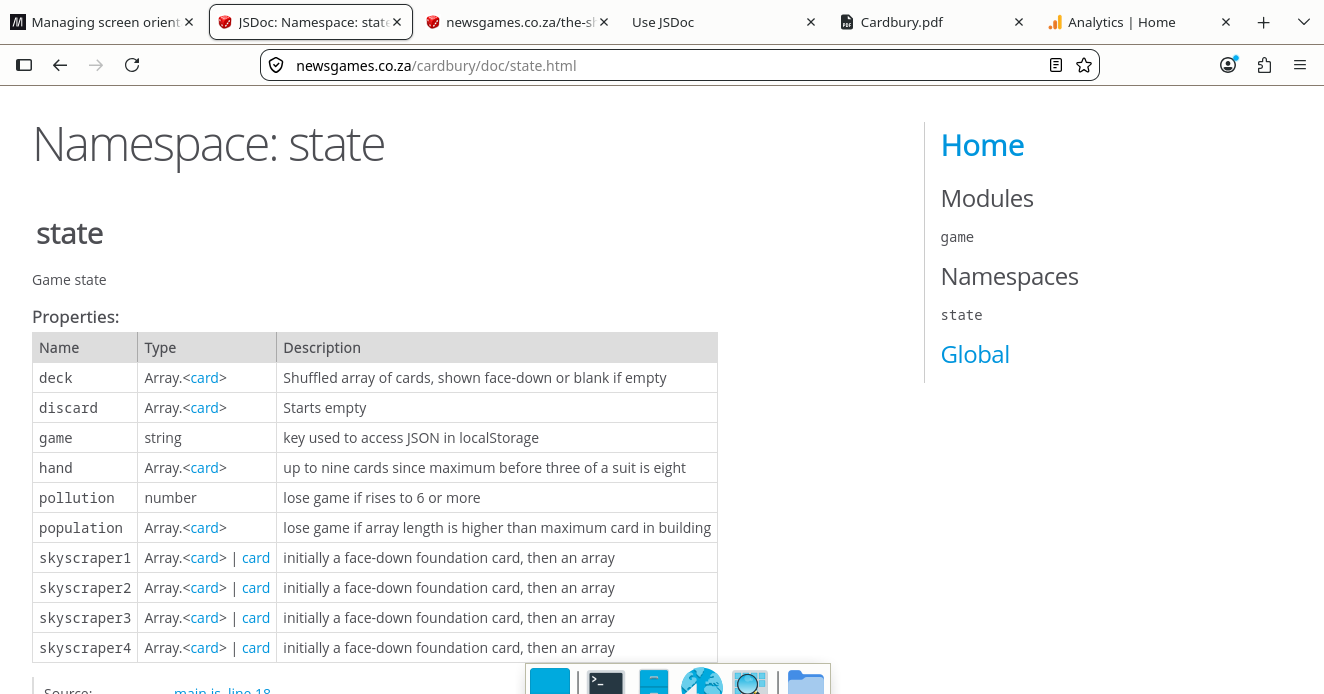
JSDoc for leaves and branches
JSDoc says it uses Closure
Compiler syntax in its @type {typeName} structured
comments, where typeName can be either type[]
or Array.<type>.
A fairly common data structure for things like trees and graphs is for an array element to be either a leaf, known as void elements in DOM jargon, or a branch, ie a nested array. These are commonly traversed with a recursive function using Array.isArray(myArr) to either return a value or call itself with the next array.
In JSDoc, the sytax for this is {(type|type[])}.
I like to be more specific than say string[], prefering
to declare a type of eg card which is a string representing
an image filename of a card.
/**
 * The filename of a card image,
 * eg "./cards/2_of_spades.svg" or "./cards/jack_of_diamonds.svg"
 * @typedef {string} card
 */

/**
 * Game state
 * @namespace {Object} state
 * @property {card[]} deck - Shuffled array of cards, shown face-down or blank if empty
 * @property {card[]} discard - Starts empty
 * @property {string} game - key used to access JSON in localStorage
 * @property {card[]} hand - up to nine cards since maximum before three of a suit is eight
 * @property {!number} pollution - lose game if rises to 6 or more
 * @property {card[]} population - lose game if array length is higher than maximum card in building
 * @property {(card[]|card)} skyscraper1 - initially a face-down foundation card, then an array
 * @property {(card[]|card)} skyscraper2 - initially a face-down foundation card, then an array
 * @property {(card[]|card)} skyscraper3 - initially a face-down foundation card, then an array
 * @property {(card[]|card)} skyscraper4 - initially a face-down foundation card, then an array
 **/
The JSDoc output looks like so: